
The Proactive Scan option in cPFence controls the speed of detection and scanning in the Malware Real-time Protection (MRTP) module. This feature is off in the free version and cannot be turned on. For the paid version, it is always on and recommended to maintain optimal detection speed.
Managing Proactive Protection via WebUI
To enable or disable proactive scan in the WebUI:
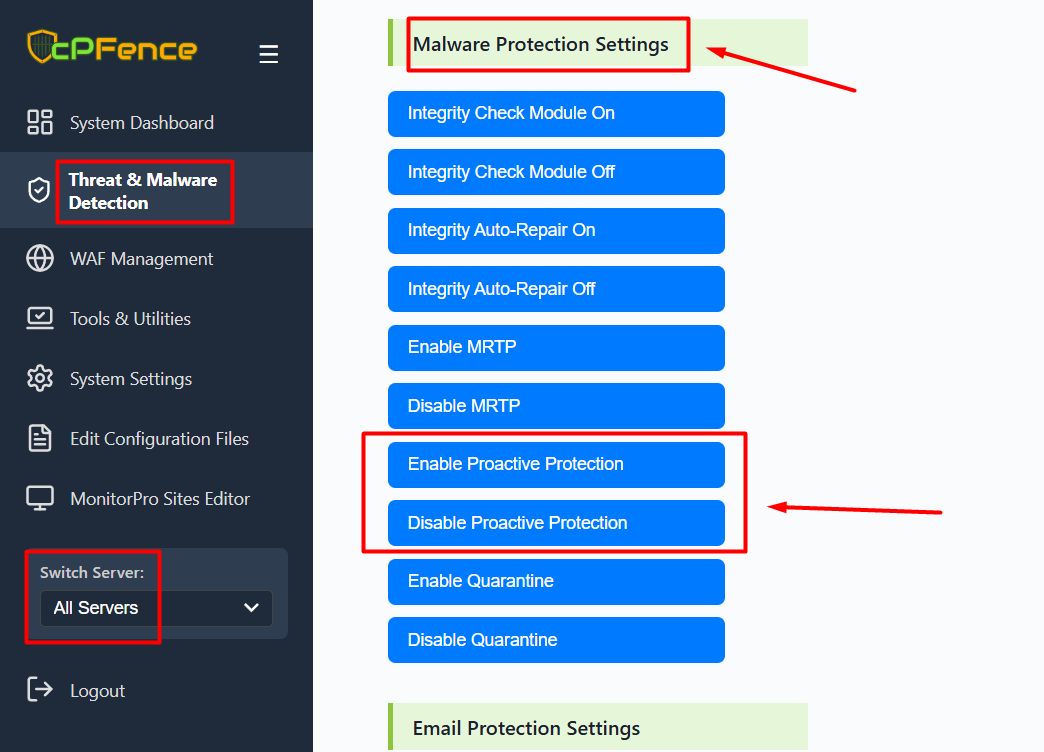
- Open the cPFence WebUI on your Main Control Panel server.
- Go to Threat & Malware Detection from the left menu.
- Scroll to the Malware Protection Settings section.
- Click Enable Proactive Protection or Disable Proactive Protection as needed.
Important Note:
It is recommended to turn off Proactive Scan if you are running a low-performance server (HDD, few CPU cores, etc.). Using HDDs for hosting is not recommended in 2025; they are only suitable for storage and backups.
Using CLI :
Enable Proactive Scan
To enable Proactive Scan, use the following command:
cpfence --enable-proactiveThis command enables fast detection of threats, providing enhanced security.
Disable Proactive Scan
To disable Proactive Scan, use the following command:
cpfence --disable-proactiveThis command slows down the detection process and not recommended.